Hand-Hit Setting Tool for Snap Buttons, Eyelets, Rivets and Jeans Buttons
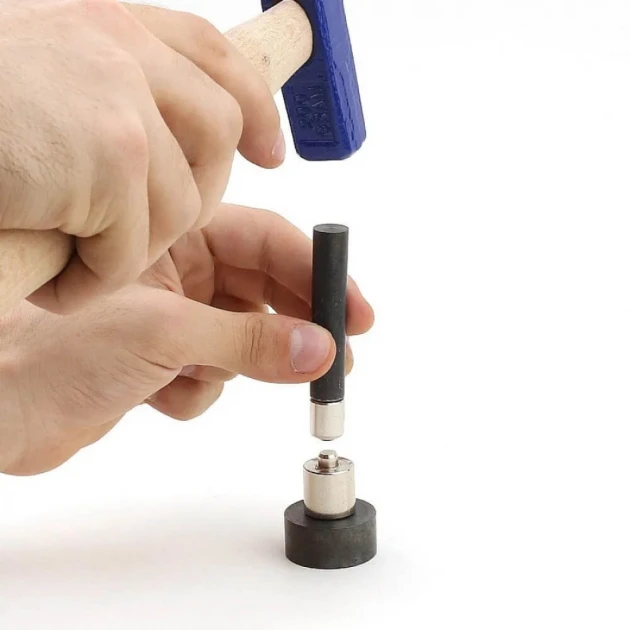
Hand-hit setting tool is a manual installation accessory used for applying snap buttons, eyelets, rivets, jeans buttons and similar setting products without a press. It allows small installation jobs to be done with a hammer and compatible setting dies.
This product is useful for hobby users, sample makers, repair work, small workshops and applications where a press or machine cannot reach the installation point. It is not designed for mass production; it should be positioned as a practical tool for small-scale and occasional use.
Manual Application Without a Press
The hand-hit tool is used with compatible dies and a hammer. The lower base supports the bottom part, while the upper holding rod helps apply pressure from above. This structure allows compatible press-type dies to be used in a manual setting process.
Suitable for Snaps, Eyelets, Rivets and Jeans Buttons
The tool can be used for snap buttons, eyelets, rivets, jeans buttons and some hidden snap applications. However, each product size and system may require its own compatible setting die. For best results, the product code or the item to be applied should be specified when ordering matching dies.
Not Recommended for Mass Production
This tool is not intended for high-volume or continuous production. For repeated production, a hand press or suitable mounting machine is recommended.
It is more suitable for sample work, repair jobs, field use, small-batch installation and applications where a machine cannot reach the desired area.
Package Content
- 1 upper hand-held rod
- 1 lower die base
Setting dies shown in product images may be for demonstration purposes only. Compatible dies for the snap, eyelet, rivet or jeans button to be applied should be selected separately.
Material
The product is made from iron / metal. Since it is used with hammer impact, it should be used on a stable and firm surface. Keeping the tool aligned during application helps achieve a cleaner setting result.
Usage Areas
- Snap button setting
- Eyelet / grommet setting
- Rivet installation
- Jeans button setting
- Hidden snap applications
- Craft and DIY projects
- Repair, alteration and sample work
- Manual installation in hard-to-reach areas
Product Details
| Product Type |
Hand-Hit Setting Tool |
| Product Model |
Manual Setting Tool |
| Application Method |
Hammer-Assisted Manual Setting |
| Compatible Product Group |
Snap Buttons, Eyelets, Rivets, Jeans Buttons |
| Package Content |
Upper Hand-Held Rod + Lower Die Base |
| Material |
Iron / Metal |
| Production Suitability |
Small-Batch Application |
| Mass Production Note |
Not Recommended for Mass Production |
| Usage Area |
DIY, Repair, Sampling, Workshop Support |
Why Choose This Tool?
- Provides a practical manual solution for users without a press.
- Can be used with snap buttons, eyelets, rivets and jeans buttons when paired with compatible dies.
- Helpful for hard-to-reach installation points.
- Suitable for sampling, repairs, DIY and small-batch work.
- Allows compatible press-type dies to be used manually.
- A cost-effective auxiliary tool for occasional setting applications.
Frequently Asked Questions
1. Can this tool set snap buttons by itself?
No. This is the main hand-hit tool. A compatible setting die is also required for the snap, eyelet, rivet or jeans button you want to apply.
2. What products can it be used with?
It can be used with snap buttons, eyelets, rivets, jeans buttons and some hidden snap applications.
3. Is it suitable for mass production?
No. It is not recommended for mass production. It is better suited for small jobs, samples, repairs and manual applications.
4. Can it replace a hand press?
It can be used for small-scale applications, but for regular and high-volume production a hand press or compatible machine is recommended.
5. What is included in the package?
The package includes one upper hand-held rod and one lower die base.
6. Are setting dies included?
No. Dies shown in images may be for demonstration purposes. You need to choose a compatible die for the product you want to apply.
7. What should I mention when ordering?
You should mention the product you want to apply and, if possible, the product code to help choose the correct compatible die.

.jpg-40x40.webp)

.jpg-40x40.webp)


.jpg-40x40.webp)
.jpg-40x40.webp)


-no5-k0010%20(3).jpg-40x40.webp)


-K0014.png-40x40.webp)


.jpg-40x40.webp)


.jpg-40x40.webp)
.jpg-40x40.webp)


.jpg-40x40.webp)
.jpg-40x40.webp)


.jpg-40x40.webp)


.jpg-40x40.webp)


.jpg-40x40.webp)

.jpg-40x40.webp)


.webp-630x630.webp "Snap Fasteners Mold Tool Set - KLP00EL02")
.webp-630x630.webp "Snap Fasteners Mold Tool Set - KLP00EL02")
.webp-630x630.webp "Snap Fasteners Mold Tool Set - KLP00EL02")
.webp-630x630.webp "Snap Fasteners Mold Tool Set - KLP00EL02")
.webp-630x630.webp "Snap Fasteners Mold Tool Set - KLP00EL02")
.webp-630x630.webp "Snap Fasteners Mold Tool Set - KLP00EL02")
.webp-630x630.webp "Snap Fasteners Mold Tool Set - KLP00EL02")
.webp-630x630.webp "Snap Fasteners Mold Tool Set - KLP00EL02")
.webp-630x630.webp "Snap Fasteners Mold Tool Set - KLP00EL02")
.webp-630x630.webp "Snap Fasteners Mold Tool Set - KLP00EL02")
.webp-80x80.webp "Snap Fasteners Mold Tool Set - KLP00EL02")
.webp-80x80.webp "Snap Fasteners Mold Tool Set - KLP00EL02")
.webp-80x80.webp "Snap Fasteners Mold Tool Set - KLP00EL02")
.webp-80x80.webp "Snap Fasteners Mold Tool Set - KLP00EL02")
.webp-80x80.webp "Snap Fasteners Mold Tool Set - KLP00EL02")
.webp-80x80.webp "Snap Fasteners Mold Tool Set - KLP00EL02")

.webp-80x80.webp "Snap Fasteners Mold Tool Set - KLP00EL02")
.webp-80x80.webp "Snap Fasteners Mold Tool Set - KLP00EL02")
.webp-80x80.webp "Snap Fasteners Mold Tool Set - KLP00EL02")
.webp-80x80.webp "Snap Fasteners Mold Tool Set - KLP00EL02")
.png-230x230.webp "54 Single Cap Rivet 12 mm (0.47\") / 7.5 mm (0.29\") Post Steel Rivet – 500 Pieces R0004")
_1_11zon.webp-230x230.webp "0 Rivet 6 mm (0.24\") Cap / 6-6.5 mm (0.24\"-0.26\") Post Steel Rivet – 1000 Pieces R0006")
.webp-230x230.webp "61 Double Cap Rivet 15 mm (0.59\") Cap / 12 mm (0.47\") Back Cap / 7 mm (0.28\") Post Steel Rivet – 500 Sets R00061CFT-7")
.jpeg-230x230.webp "Prong Snap Fasteners Mold - Lid Snap Fasteners 9,5 Fastening Tool KLP0092")
.webp-230x230.webp "0 Double Cap Rivet Setting Die – 6 mm (0.24\") Double Cap Rivet Installation Tool KLP000CFT-6")
.webp-230x230.webp "0 Rivet Setting Die – 6 mm (0.24\") Single Cap Rivet Installation Tool KLP000-6")
.webp-230x230.webp "00 Double Cap Rivet Setting Die – 5 mm (0.20\") Double Cap Rivet Installation Tool KLP0000CFT-5")
.webp-230x230.webp "00 Single Cap Rivet Setting Die – 5 mm (0.20\") Rivet Installation Tool KLP0000-5")
